How to use Amazon price tracking tools for the best Black Friday & Cyber Monday deals
Set alerts, track price history, and plan your wishlist in advance so you only buy when prices hit their lowest.
Jan 10, 2026

There are few things worse than buying an item you’ve had your eye on, only to see it drop in price just a few days later.
That’s just one reason why waiting until Black Friday or Cyber Monday to make a big purchase can be a sensible move.
On these annual shopping events, shops and retailers around the world drop prices to encourage shoppers to buy more products.
But tracking prices during the Black Friday weekend isn’t always as straightforward as it seems. Not only can prices fluctuate during the Black Friday period, but some retailers will even put their prices up beforehand in order to take money off when the event rolls around – making it hard to understand whether a deal really is as good as it sounds.
At Moonsift, we’re all about helping you to make informed purchasing decisions. So, we’ve done a ton of research and produced this handy guide on how to use Amazon price tracking tools to get your hands on the best Black Friday and Cyber Monday deals.
So, start creating those wishlists, check out the best price tracking tools, and when the time comes, enjoy nabbing some great Black Friday deals from Amazon!
Why Amazon prices are hard to track during Black Friday
As we’ve touched upon already, tracking Amazon prices manually during the Black Friday and Cyber Monday shopping events isn’t straightforward.
Here are a few reasons why.
Dynamic pricing
Firstly, Amazon uses algorithms to adjust its prices throughout the year, sometimes even on a daily basis.
Pricing can be based on factors like demand, stock levels, competitor pricing and even the time of day!
With this in mind, it’s worth noting that even if a product is heavily discounted on Black Friday, it may still be cheaper at other times of the year. Plus, prices can fluctuate during the Black Friday period itself. Which brings us onto…
Extended sale period
Although the sale event has traditionally been focused on Black Friday itself (the Friday after Thanksgiving), many retailers now have an extended sale period at this time of year.
Often, this will start on Black Friday and then run through the weekend into Cyber Monday.
However, it’s becoming more and more common to launch Black Friday deals earlier and extend them later, so that the sales event lasts a week or more.
Frequently, retailers that do this will launch different deals on different days of the event. So, it can be very difficult to know which day to purchase an item you’re after, to get the best price.
Inflated ‘was’ prices
One way that retailers will draw you into a deal is by showing you an attractive ‘was/now’ price.
However, these can be misleading.
Sometimes, sellers inflate the ‘was’ price to make the discount seem bigger than it is. For instance, instead of listing the price the item was sold for immediately previously, they might list a price from months before.
RRPs vs real prices
Likewise, Amazon often uses Recommended Retail Prices (RRPs) as a reference point when it displays Black Friday deals.
A product’s RRP is simply the price recommended by the manufacturer.
As such, it isn’t necessarily a price that Amazon has ever charged for a product before, and doesn’t fairly reflect how much the product has been discounted.
Price markups
Another common tactic that retailers like Amazon use is significantly marking up the price of an item immediately prior to the Black Friday period.
This means that they can then slash the price on Black Friday to make the discount look bigger.
Third party sellers
Bear in mind that not all products on Amazon’s marketplace are sold directly by the retailer.
Rather, more than 60% of sales in the Amazon store actually come from independent sellers, most of which are small and medium-sized businesses (according to a report from Amazon Selling Partners).
This means you’ll often find the same product sold at several different price points (and even with different delivery fees, which won’t usually be factored into the deal price you see at first glance).
These sellers will all have their own pricing strategies and policies, which can be different from Amazon’s and make for a confusing experience for consumers.
Limited stock
Many Black Friday deals are limited in stock.
Although a variety of items will be on sale on the Amazon website, they’ll only be available while supplies last, and sellers can even limit stock deliberately to create a sense of urgency.
This means that sometimes, only a handful of consumers will be able to get their hands on the item at the advertised price.
Plus, it’s a tactic that creates a sense of urgency in shoppers, who might be more inclined to buy if they’re worried about the item selling out.
How to track Amazon prices during Black Friday & Cyber Monday
Luckily, there is a way to accurately track Amazon prices during Black Friday and Cyber Monday. And no, it doesn’t involve realms of open tabs and spreadsheets.
Rather, there’s a range of handy Amazon price tracking tools that can do the hard work for you.
These tools come in lots of different shapes and sizes, from browser extensions to websites and mobile apps. But they all help users to track price changes for products on Amazon, so that they can spot when a deal really is a good deal, and buy when the price is right (whether that’s on Black Friday, Cyber Monday, or another time of year entirely).
Check out our list of the best Amazon price trackers below
Choose the best tracker (or combination of trackers) for your needs
Use your chosen tool to check the price history for your favorite products and spot patterns
Set up price drop alerts for the products you’re interested in
Save items you have your eye on to your Moonsift collections, so you can buy them when the time is right
By relying on an Amazon price tracking tool instead of manually checking prices yourself, you’ll be able to save time, save money and make informed purchasing decisions that you won’t regret.
Best Amazon price tracker tools for Black Friday & Cyber Monday
So, what are the top Amazon price tracker tools to have up your sleeve as Black Friday and Cyber Monday approach?
We looked at reviews, downloaded some top tools and did a load of research to uncover the very best. Here are our top picks for helping you to save money and be a more discerning shopper heading into what’s arguably the biggest retail event of the year!
Just bear in mind that, while we believe that each of these tools deserves its place on our list, they each have their pros and cons.
So, take a look at the good, the bad and the ugly, and consider how you would integrate each one in your shopping habits when you’re making your decision on which to try for yourself.
1. CamelCamelCamel – Best all-rounder Amazon price tracker
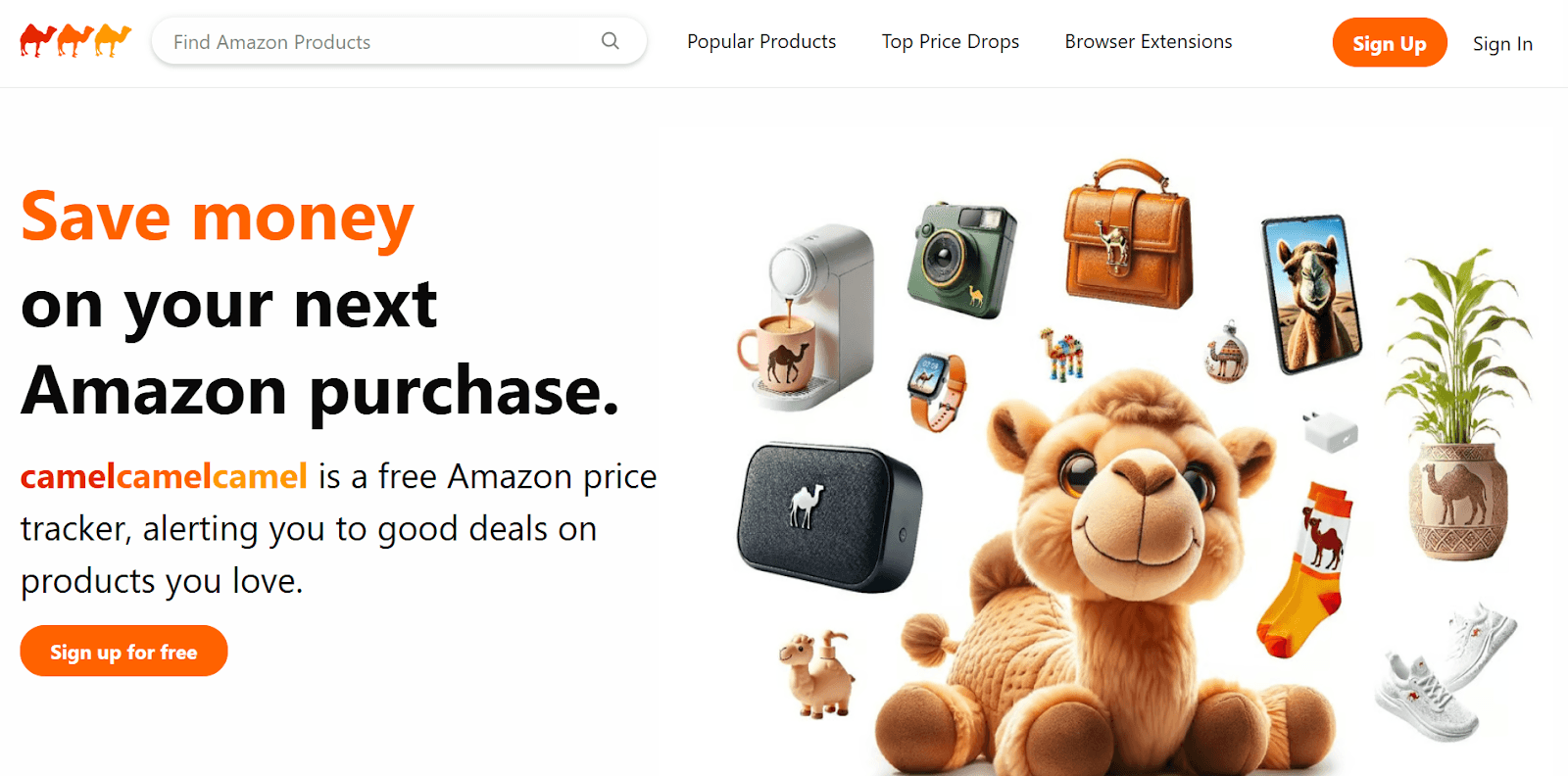
CamelCamelCamel is probably the most popular Amazon price tracker available, and it’s easy to see why.
This free browser extension offers in-depth historical price data for millions of Amazon products.
For any product you’re interested in purchasing, you can simply head to the Amazon website and view a price history chart along with its average list price.
In this way, you can be much more discerning when it comes to Black Friday and Cyber Monday deals. A quick glance at the price history chart will show you how good a deal really is, so that you don’t get carried away by inflated ‘was/now’ prices.
Plus, you can make a good guess of the best time to make a purchase within the Black Friday period, based on how prices adjusted over the sale period in previous years.
Essentially, if you’re looking to buy a TV, you can check whether it’s historically been discounted the most on Black Friday itself or another day in the extended sales period, to help you understand when to click that ‘buy’ button.
And remember, it may even be that waiting for another sales event, like Amazon Prime Day, actually reaps the biggest savings.
You can also set up price drop alerts so that you get notified when an item you’re eyeing up drops to a price you’re happy with.
Just be aware that not all the deals flagged up on CamelCamelCamel will necessarily be from trusted sellers. As is the case with all these price tracking tools, it pays to make sure the seller has a history of verified purchases before jumping at a bargain.
“I didn't realize that offering was from a brand new third-party seller/scammer. These sellers take forever to move on the product, then send you a fake tracking number (that constantly claims the item has "shipped" and is in "transit from seller to the carrier"). They give you an obscenely far off delivery date and, since the item has "shipped", they've taken your money and you can't just cancel your order.” – Reddit user
Available on
Browser extension (Google Chrome, Microsoft Edge, Mozilla Firefox, Opera, Apple Safari)
Key features
Price history charts
Price drop alerts
Highlighted deals
Pros
View deals in categories you frequently track products in
View deals by daily, weekly and most recent
See what other CamelCamelCamel users have been purchasing
View in-depth price history for each item
Get price drop alerts when an item drops to a price you’ve set
Available in multiple countries and languages
Easy to use
Access from any device
Cons
Highlighted deals won’t always be from trusted sellers
Deals may only apply for a specific color or version of an item you want
Only tracks Amazon (you may still be able to find the item for cheaper elsewhere)
Pricing
Free.
2. Keepa – Best for in-depth tracking and data
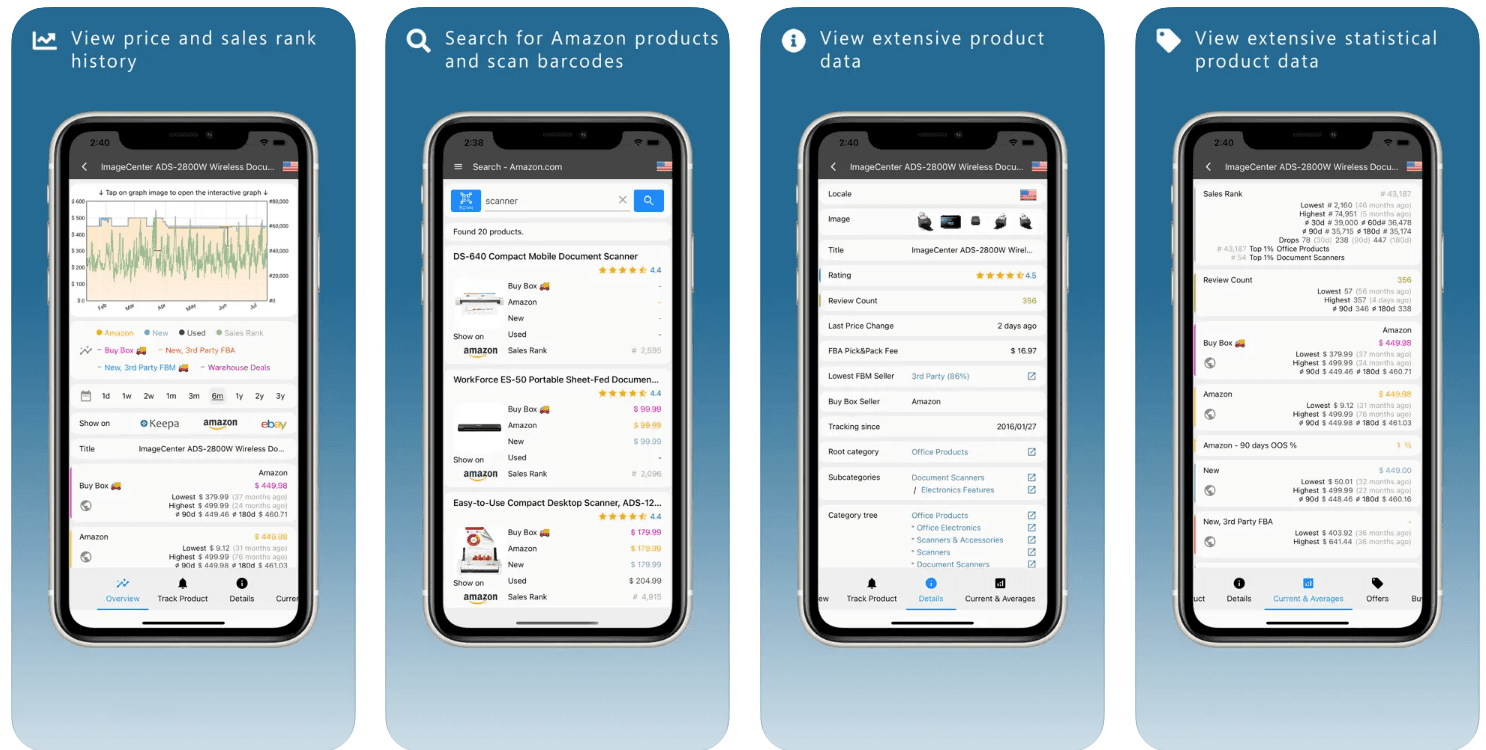
Keepa is a top alternative to CamelCamelCamel, designed especially for Amazon price tracking.
Just like CamelCamelCamel, it’s great for tracking prices online and has price history charts for over 4 billion Amazon products.
However, where it really excels is in the level of detail it provides.
A handy dashboard displays in-depth information about your favorite products, including stats on review numbers, ratings, price changes, average price and more (although be aware that this level of data can be a little overwhelming if you’re not used to it).
Unlike CamelCamelCamel, you can even upload a list of ASINs (the 10-character reference number assigned to each product on Amazon) to create a price watch for every item on your wishlist at once.
The added benefit of this is that you can monitor for different product variations, like colors, sizes and styles, to make sure that the alerts and data you see are ultra-specific and relevant to your needs.
The only real downside is the cost. While most of the top Amazon price tracking tools on our list are free, you’ll need to pay a hefty monthly subscription cost to access all of Keepa’s features.
Yes, there’s a free version available, but it’s very limited and will see you missing out on some of the app’s most important features, like those interactive price history graphs.
“Keepa is awesome for price tracking and historical data—it’s all about those charts and trends.” – Reddit user
Available on
Browser extension (Firefox, Google Chrome, Opera, Microsoft Edge, Apple Safari)
App (Android, iOS)
Key features
Price history charts
Price drop alerts
Availability alerts
Compare and track international Amazon prices
Daily deals
Pros
Free version available
View deals in favorite product categories
View in-depth data for each item
See price history charts for each item
Get price drop alerts when an item drops to a price you’ve set
Available in multiple countries and languages
Access from any device
Cons
Complex interface
Can’t search for specific products on the app (need to compile a list of ASINs)
Limitations on the free version
Pricing
Free version (limited features) / premium version $19 per month.
3. PriceSpy – Best for product comparisons
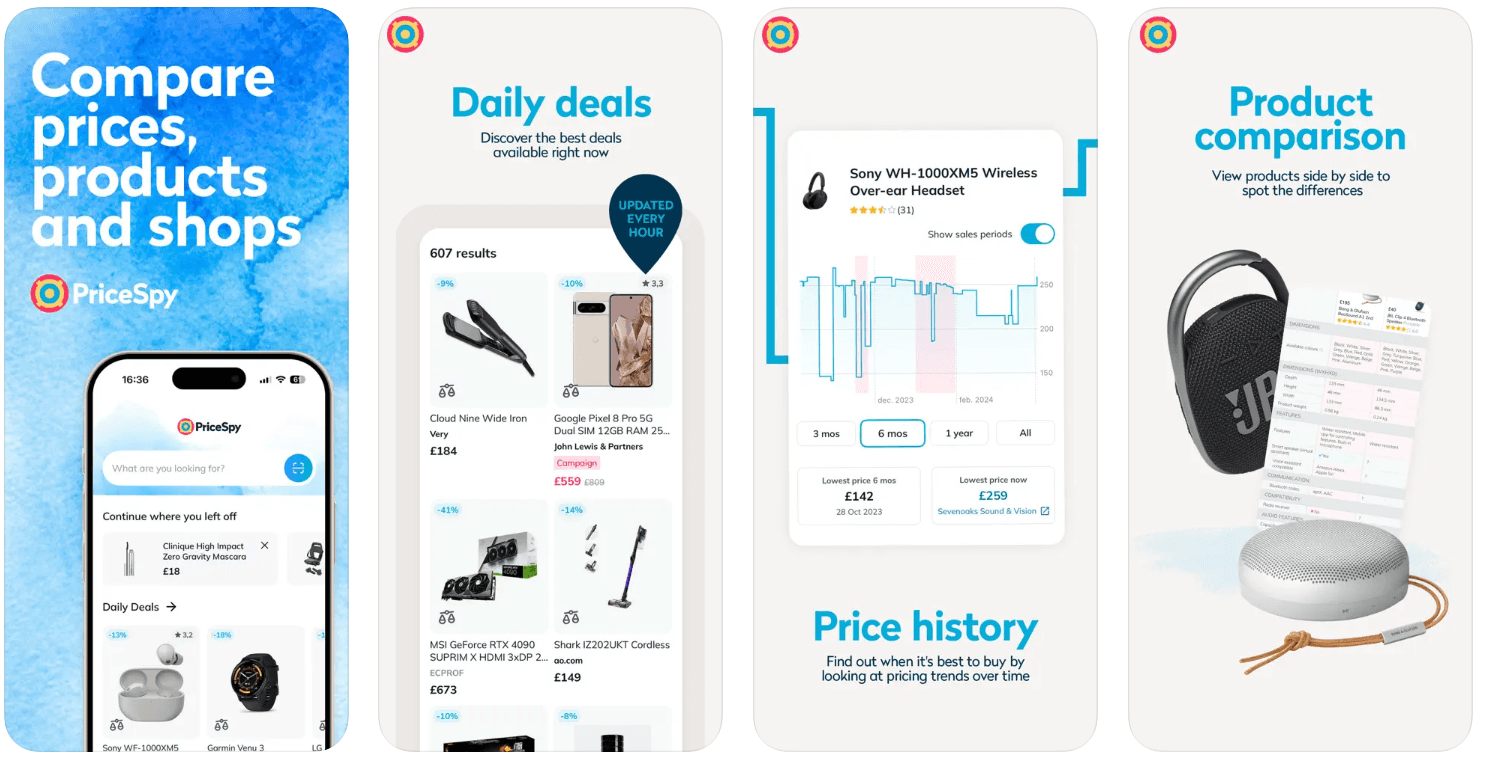
PriceSpy isn’t designed just for Amazon, but that’s actually one of its strengths.
By allowing you to track and compare prices on both Amazon and over 6,100 other stores, PriceSpy helps to make sure you’re not just buying at the right time, but also buying from the store with the best deal (let’s face it, this isn’t always Amazon!).
Like the other tools we’ve covered so far, PriceSpy offers price drop alerts and dynamic price history graphs to help you understand pricing trends over time.
Interestingly, the price history charts also give you the option to include or exclude sale periods, so that you can get a really clear idea of a product’s usual pricing and how sales periods compare.
However, where PriceSpy really stands out is in the way that it helps you easily line up products (and prices) side by side, so that you can compare specs and really understand what you’re paying for. This is especially handy when it comes to tech.
After all, sometimes it’s worth paying a little more for a newer model. But sometimes, the spec just doesn’t warrant the higher price tag. And PriceSpy is a price comparison app that can help you see when that’s true.
“It's a site that allows you to see which stores sell the product cheapest mainly. With some reviews. An excellent site, I use it often when looking for appliances etc.” – Reddit user
Available on
App (Android, iOS)
Key features
Product search
Product and price comparisons
Deals and promotions
Price history
Price alerts
Pros
Monitors hundreds of thousands of products
Search and compare products side by side to choose the right one
Compare Amazon prices to other stores
Cons
Can show irrelevant products
Pricing
Free.
4. Honey – Best for coupons
As you’ve probably noticed, you’ll often find the same item being sold at multiple price points on the Amazon marketplace by different sellers – just one of the things that can make tracking prices during the Black Friday sales difficult.
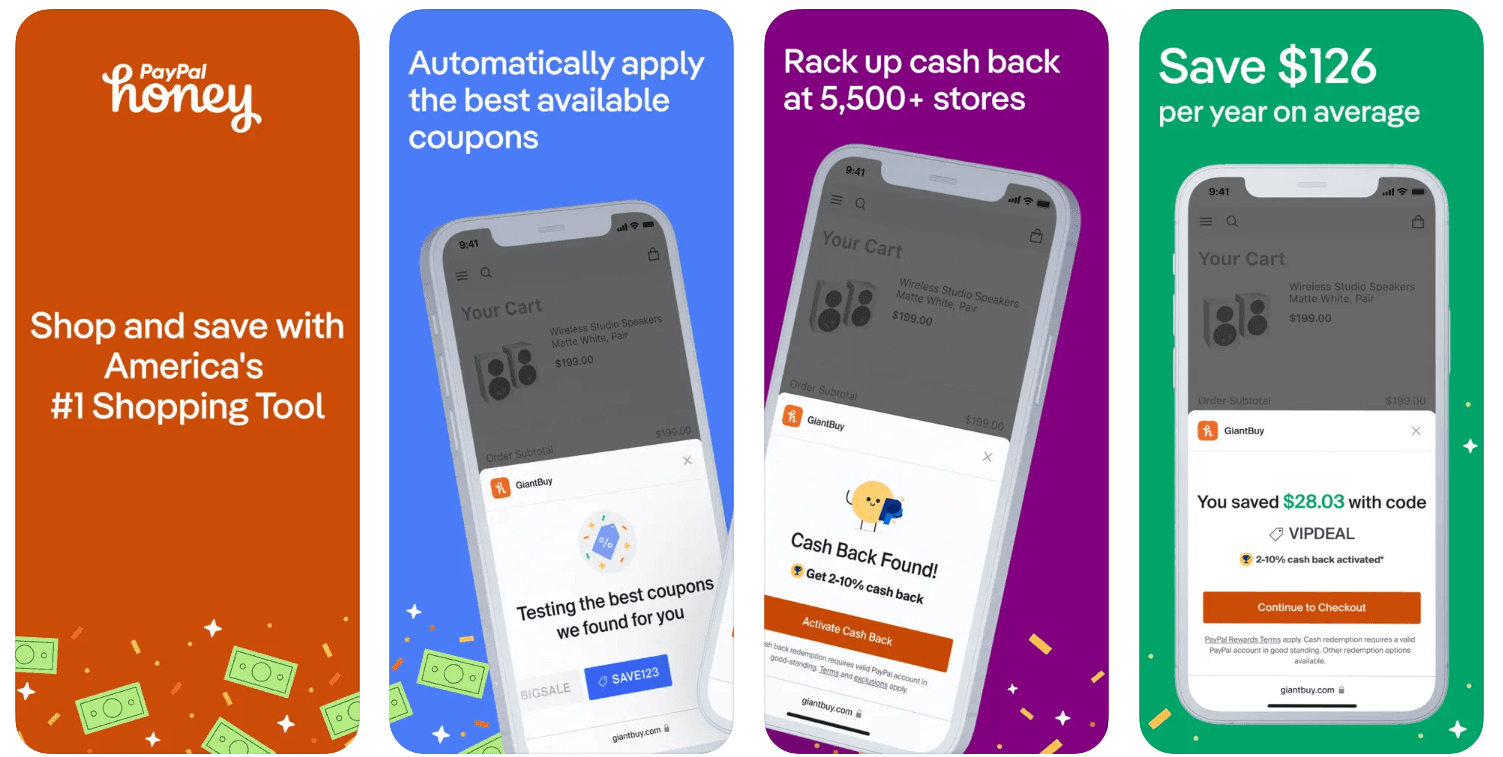
However, Honey does the hard work for you by comparing sellers to find you the lowest price, even taking into account shipping fees. All you have to do is look out for the Honey button when you’re browsing on Amazon, to find out if you can get the item for less from another seller.
This is in addition to providing price history data and price drop alerts for items on the Amazon marketplace.
But that’s not all.
Honey is arguably best known for finding coupons. With just one click, the app and browser extension will test discount codes for you at checkout to gain you extra money off. And it works at more than 30,000 stores, meaning it’s a great way to save money every day.
Just be aware that Honey has gained a bad reputation recently for allowing merchants to control which coupon codes are displayed, and taking commission away from affiliates by reloading the web pages that come up when you click an affiliate link.
“If there’s a 20% coupon available, Honey will deliberately avoid using it if the brand prohibits excessive coupon usage. They’ll offer a 5% discount or inform you that there’s nothing available, even though a 20% coupon is still available.” – Reddit user
Available on
Browser extension (Chrome, Safari, Firefox, Microsoft Edge)
App (Android, iOS)
Key features
Automatic coupon search
Price history charts
Price drop alerts
Amazon seller comparison
Pros
Cash back at 5,500+ stores
Compare sellers to find the best price
View price history for each item
Get price drop alerts when an item drops to a price you’ve set
Easy to use
Access from any device
Useful for deal finding on lots of sites (not just Amazon)
Cons
May take commission
Might not always show you the best coupons available
Pricing
Free.
5. SlickDeals – Best community-powered deal alerts
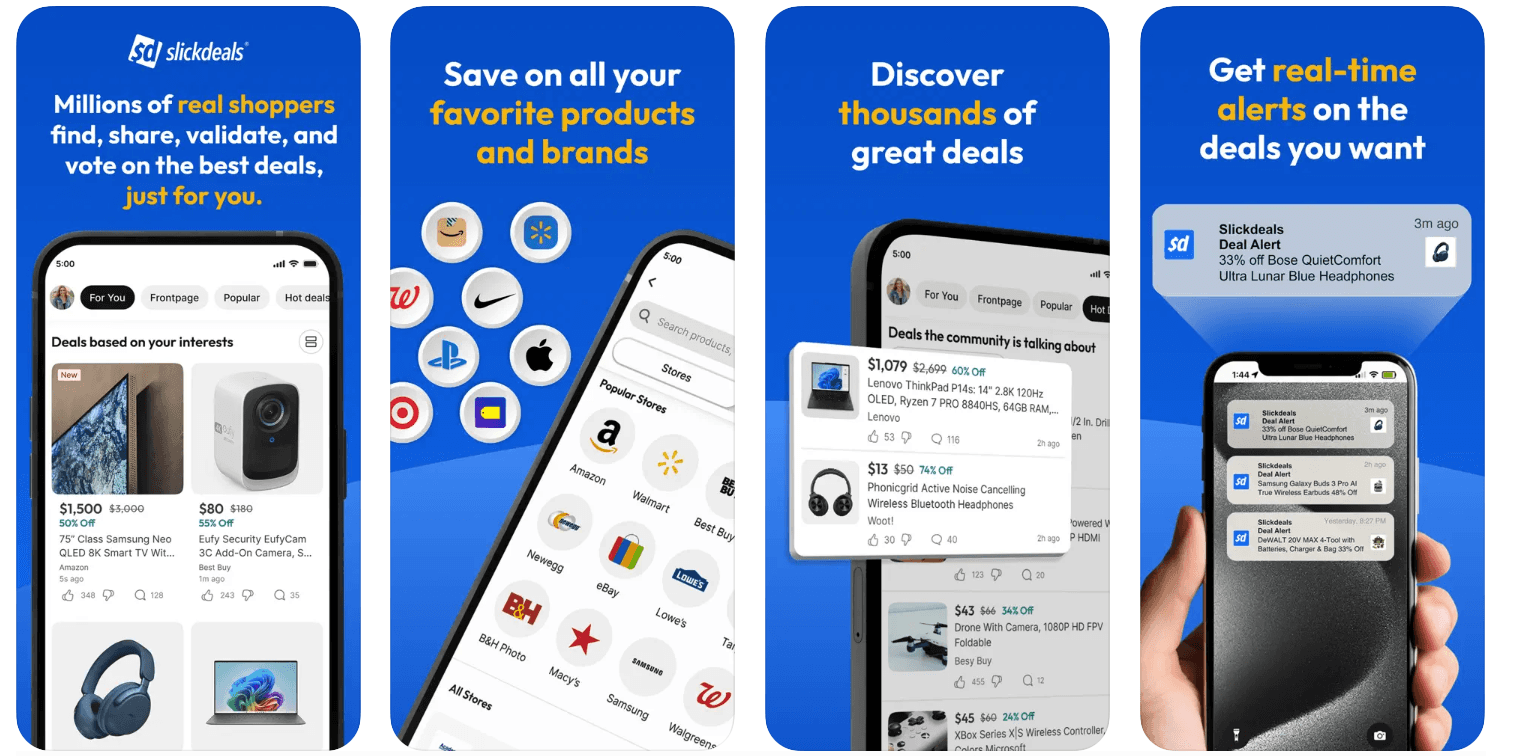
While it’s not a tracking tool as such, SlickDeals is a great tool to have up your sleeve when shopping for Black Friday deals from Amazon.
It’s the only tool we’ve come across that features exclusively community-sourced deals.
Users can post deals and browse deals that have been posted by other members of the user community, as well as upvoting or downvoting to indicate how good they think a deal is.
In this way, it can help you to find the best offers that have been tried, tested and approved by other shoppers.
The platform features deals from all over the web, although Amazon deals are heavily featured.
Just be careful to only buy items that you actually have on your wishlist, as seeing so many featured deals does make it easy to go off-piste and buy more than you were planning to.
Luckily, you can set up custom deal alerts to let you know when your favored items or product categories come up, which can help you to keep your spending under control!
“If I had not found this site I would not have saved so much money (or bought so much unnecessary stuff 😄}, but it has been great to pick up items at substantial discounts when most of the time I would probably have had to pay full price.” – Reddit user
How to set price alerts for Amazon Black Friday
Setting price alerts for Amazon items ahead of Black Friday can be a great way to catch items you’ve had your eye on when they reach a price you’re willing to pay.
You can set price alerts up using any of the price tracking tools we’ve mentioned above:
CamelCamelCamel
Keepa
PriceSpy
Honey
SlickDeals
And even right here on Moonsift!
In some cases, you can simply put items on your wishlist and receive notifications when they drop in price.
In others, you can actually set a price you’re willing to pay, so that you only get notified when the item drops to that price or less.
Looking at historical price data can be a great way to decide what price to enter for a price drop alert. For instance, you could enter the lowest price that item has reached over the last year, or the same price it dropped to last Black Friday.
Ultimately, it all depends on how much you want the item, and how much you’re willing to pay!
How to maximize Black Friday savings on Amazon
So, now you know some of the tools that can help you uncover the best Black Friday and Cyber Monday deals on Amazon.
But that’s often not enough if you’re looking to really maximize your Black Friday savings.
Rather, you’ll need to have a clear plan to help you uncover the deals that you’re most in need of, and curb impulse spending. Here are our top tips.
Create a wishlist in advance
First things first, create a list of items that you’re hoping to purchase from Amazon (and elsewhere) in the Black Friday sales.
One of the dangers of Black Friday is getting drawn in by an offer for an item that you weren’t planning to buy – meaning you end up spending more than you wanted.
Instead, having a clear list will help you to stay on track and avoid impulse purchases, so that you only spend money on items you actually want and need.
That’s where Moonsift comes in!
Our free universal wishlist tool allows you to save all the items you have your eye on in one easy-to-manage place – and even share it with friends and family, so that you’re all on the same page.
Plus, we’ll send you price drop alerts so you can see whether an item has dropped (or increased!) in price since you saved it. In this way, it’s the perfect companion to your chosen Amazon price tracking tools.
Choose Amazon price tracking tools
Next, choose your favorite Amazon price tracking tool, or a combination of a few of them.
The tools we’ve listed in this guide all have their pros and cons. However, features to look out for include:
Historical price charts so you can see pricing patterns for your favorite products
Price drop alerts so you can see when an item drops in price without having to check manually
Wishlist syncing so you can get alerts about items that are relevant to your needs
Seller comparisons so you can find the seller with the best price for a given item
Product comparisons so you can compare similar products at different price points
Highlighted deals so you can see the best or most popular deals in one place
When you’re deciding on the best tracking tools for you, we’d always recommend thinking about your personal shopping habits and how hands-on you want to be when searching for deals.
As an example, Honey will help you to save money with almost no effort on your part – you just need to look out for their button when you’re browsing on Amazon and they’ll search for cheaper sellers and coupons automatically.
On the other hand, Keepa is rich in data insights, meaning it’s a great option for shoppers who like to be fully in the know.
Set price drop alerts
Use your chosen Amazon price tracking tool to set price drop alerts.
Every tool works differently, so you’ll need to check what the process is for your chosen price tracker.
However, you’ll usually be able to add your favorite items to a wishlist, watchlist, or similar. Here, you’ll have the option to turn on notifications if the product drops in price.
Depending on the tool, you may even be able to input a price manually, so that you only get notified if the product reaches a price that you’re happy to pay.
Remember, Moonsift can send price drop alerts too. So, adding your favorite items to your Moonsift wishlist is a great way to make sure you’re fully up-to-date about any discounts on your favorite items.
Check historical price data
When you see a Black Friday or Cyber Monday deal on Amazon that you like the look of, pause before you click buy.
First, use your Amazon price tracking tool to check the product’s historical price data.
Look at how the current price compares to real prices the product has sold for in the past (rather than the RRP), and check whether the price was inflated before Black Friday to make the deal look better than it is.
Likewise, look at how the product’s price changed over previous Black Friday periods, to try and predict whether prices could drop further still in the coming days.
All this will help you to verify whether or not a deal is really as good as it sounds, and whether it’s worth purchasing now or holding out for longer.
Compare retailers
Make sure to compare prices across multiple sites and sellers to make sure you’re definitely paying the lowest price possible.
Historical price data will only allow you to track how an item’s pricing has changed with one particular retailer.
However, the same item will often be sold by different retailers at different price points. Even on the Amazon marketplace, you’ll find the same product being sold at different prices by different sellers.
Some price tracking tools, like PriceSpy, will help you to compare retailers so you can check whether the item you’re after is being sold for less elsewhere.
Meanwhile, others, like Honey, will help you to compare Amazon sellers to make sure you’re bagging yourself the best deal on Amazon for your chosen product.
Search for coupons
Sometimes, a coupon or discount code can give you an extra discount on top of any Black Friday deals you may have found.
Honey is a price tracking tool that will automatically search for coupons for you at checkout, so you can claim additional savings on your purchase.
However, it may not give you access to every discount code available.
You can also look out for coupons and discount codes on the Amazon website, and sign up to other third-party coupon sites like Groupon.
Get cashback
Teaming your Amazon price tracking tools with a cashback app can be another excellent way to maximize your Black Friday savings on Amazon.
Example apps include TopCashback and Quidco.
Essentially, cashback works by giving you a percentage of your purchase back as a reward.
Depending on the app, you may be able to withdraw this reward as cash, or use it to obtain money off your next purchase.
Either way, this will help you to access an even bigger saving than you would by relying on Black Friday deals alone.
What the retail data says: price fluctuations & best times to buy
There’s no definitive time of year when it’s best to make a purchase. Rather, it depends on what you’re looking to buy.
As an example, winter clothing and sports gear will often be heavily discounted in February to make room for the next season’s stock.
Likewise, August is the perfect time to purchase summer apparel and swimwear, as demand for these items drops.
So, does this mean Black Friday isn’t really as good as it sounds?
Not at all! Rather, Black Friday is often when some of the most popular technology products fall to their lowest prices.
This means it’s a great time of year to purchase electronics, such as TVs, tablets, laptops, headphones, activity trackers and smart speakers.
It can also be a good opportunity to nab a deal on a new streaming service, as providers like Hulu and Paramount+ have offered good subscription discounts during the Black Friday sales in previous years.
Just make sure that you check historical price data before buying, to make sure that Black Friday really is the best time to buy an item that you’re interested in.
A quick glance at a price history chart can show you how good the deal is that you’re looking at, so that you can work out whether to make your purchase now or whether to hold off for another period – like the January sales or Amazon Prime Day.
Nerdwallet also has a fantastic list of what items to buy at what time of year, to help you plan your purchases.
Final checklist: your Black Friday deal tracker setup
As you can see, nabbing yourself a great Black Friday deal from Amazon isn’t a given.
Although it can be a fantastic time of year to grab a deal on bigger-ticket items, some deals can also be misleading, thanks to inflated ‘was’ prices, the use of RRPs instead of real price data, and even price markups before the Black Friday period.
That’s why tracking Amazon prices during Black Friday is vital.
Luckily, there’s no shortage of Amazon price trackers that can help!
With historical price charts, price drop alerts and community-backed deals, these trackers are designed to help you spot when a deal really is a good deal, and when it’s not worth your time.
In this way, you can make sure you’re purchasing at the right time, the best price, and with all the information you need to make an informed purchasing decision.
At Moonsift, we’re all about helping our community to make informed purchasing decisions, which is why our universal wishlist tool is the perfect companion to your chosen Amazon price tracker.
Use our free tool to collate all the items you have your eye on ahead of the Black Friday sales, so you can stay on track and avoid impulse purchases. We’ll even send you price drop alerts if an item you’ve saved drops in price!
Create your free wishlist today and get the best Black Friday deals
FAQs
Does Amazon usually have deals on Black Friday?
Yes, on Black Friday, Amazon usually has deals on thousands of products across every category. Some products will even hit their lowest price of the year during the Black Friday sales, although other products will be cheaper during other months.
Is it better to buy on Amazon on Black Friday or Cyber Monday?
That depends on the item you’re looking to buy. According to USA Today, in 2024, the best deals on TVs were available on Black Friday, while the best deals for apparel took place on Cyber Monday.
You can use an Amazon price tracking tool to check items you’re interested in purchasing and see when those prices dropped to their lowest points in previous years. This information can help you decide whether to make a purchase on Black Friday itself, or whether to wait until Cyber Monday.
What is the best price tracker for Amazon?
There are lots of fantastic price trackers for Amazon. However, CamelCamelCamel and Keepa have earned a reputation as the best and are probably the best known too.
What time do Black Friday deals start on Amazon?
Black Friday deals usually start at midnight on Amazon. Although dates haven’t yet been released for 2025, sales will likely begin at midnight on Friday 28th November and continue until Cyber Monday.
There are few things worse than buying an item you’ve had your eye on, only to see it drop in price just a few days later.
That’s just one reason why waiting until Black Friday or Cyber Monday to make a big purchase can be a sensible move.
On these annual shopping events, shops and retailers around the world drop prices to encourage shoppers to buy more products.
But tracking prices during the Black Friday weekend isn’t always as straightforward as it seems. Not only can prices fluctuate during the Black Friday period, but some retailers will even put their prices up beforehand in order to take money off when the event rolls around – making it hard to understand whether a deal really is as good as it sounds.
At Moonsift, we’re all about helping you to make informed purchasing decisions. So, we’ve done a ton of research and produced this handy guide on how to use Amazon price tracking tools to get your hands on the best Black Friday and Cyber Monday deals.
So, start creating those wishlists, check out the best price tracking tools, and when the time comes, enjoy nabbing some great Black Friday deals from Amazon!
Why Amazon prices are hard to track during Black Friday
As we’ve touched upon already, tracking Amazon prices manually during the Black Friday and Cyber Monday shopping events isn’t straightforward.
Here are a few reasons why.
Dynamic pricing
Firstly, Amazon uses algorithms to adjust its prices throughout the year, sometimes even on a daily basis.
Pricing can be based on factors like demand, stock levels, competitor pricing and even the time of day!
With this in mind, it’s worth noting that even if a product is heavily discounted on Black Friday, it may still be cheaper at other times of the year. Plus, prices can fluctuate during the Black Friday period itself. Which brings us onto…
Extended sale period
Although the sale event has traditionally been focused on Black Friday itself (the Friday after Thanksgiving), many retailers now have an extended sale period at this time of year.
Often, this will start on Black Friday and then run through the weekend into Cyber Monday.
However, it’s becoming more and more common to launch Black Friday deals earlier and extend them later, so that the sales event lasts a week or more.
Frequently, retailers that do this will launch different deals on different days of the event. So, it can be very difficult to know which day to purchase an item you’re after, to get the best price.
Inflated ‘was’ prices
One way that retailers will draw you into a deal is by showing you an attractive ‘was/now’ price.
However, these can be misleading.
Sometimes, sellers inflate the ‘was’ price to make the discount seem bigger than it is. For instance, instead of listing the price the item was sold for immediately previously, they might list a price from months before.
RRPs vs real prices
Likewise, Amazon often uses Recommended Retail Prices (RRPs) as a reference point when it displays Black Friday deals.
A product’s RRP is simply the price recommended by the manufacturer.
As such, it isn’t necessarily a price that Amazon has ever charged for a product before, and doesn’t fairly reflect how much the product has been discounted.
Price markups
Another common tactic that retailers like Amazon use is significantly marking up the price of an item immediately prior to the Black Friday period.
This means that they can then slash the price on Black Friday to make the discount look bigger.
Third party sellers
Bear in mind that not all products on Amazon’s marketplace are sold directly by the retailer.
Rather, more than 60% of sales in the Amazon store actually come from independent sellers, most of which are small and medium-sized businesses (according to a report from Amazon Selling Partners).
This means you’ll often find the same product sold at several different price points (and even with different delivery fees, which won’t usually be factored into the deal price you see at first glance).
These sellers will all have their own pricing strategies and policies, which can be different from Amazon’s and make for a confusing experience for consumers.
Limited stock
Many Black Friday deals are limited in stock.
Although a variety of items will be on sale on the Amazon website, they’ll only be available while supplies last, and sellers can even limit stock deliberately to create a sense of urgency.
This means that sometimes, only a handful of consumers will be able to get their hands on the item at the advertised price.
Plus, it’s a tactic that creates a sense of urgency in shoppers, who might be more inclined to buy if they’re worried about the item selling out.
How to track Amazon prices during Black Friday & Cyber Monday
Luckily, there is a way to accurately track Amazon prices during Black Friday and Cyber Monday. And no, it doesn’t involve realms of open tabs and spreadsheets.
Rather, there’s a range of handy Amazon price tracking tools that can do the hard work for you.
These tools come in lots of different shapes and sizes, from browser extensions to websites and mobile apps. But they all help users to track price changes for products on Amazon, so that they can spot when a deal really is a good deal, and buy when the price is right (whether that’s on Black Friday, Cyber Monday, or another time of year entirely).
Check out our list of the best Amazon price trackers below
Choose the best tracker (or combination of trackers) for your needs
Use your chosen tool to check the price history for your favorite products and spot patterns
Set up price drop alerts for the products you’re interested in
Save items you have your eye on to your Moonsift collections, so you can buy them when the time is right
By relying on an Amazon price tracking tool instead of manually checking prices yourself, you’ll be able to save time, save money and make informed purchasing decisions that you won’t regret.
Best Amazon price tracker tools for Black Friday & Cyber Monday
So, what are the top Amazon price tracker tools to have up your sleeve as Black Friday and Cyber Monday approach?
We looked at reviews, downloaded some top tools and did a load of research to uncover the very best. Here are our top picks for helping you to save money and be a more discerning shopper heading into what’s arguably the biggest retail event of the year!
Just bear in mind that, while we believe that each of these tools deserves its place on our list, they each have their pros and cons.
So, take a look at the good, the bad and the ugly, and consider how you would integrate each one in your shopping habits when you’re making your decision on which to try for yourself.
1. CamelCamelCamel – Best all-rounder Amazon price tracker
CamelCamelCamel is probably the most popular Amazon price tracker available, and it’s easy to see why.
This free browser extension offers in-depth historical price data for millions of Amazon products.
For any product you’re interested in purchasing, you can simply head to the Amazon website and view a price history chart along with its average list price.
In this way, you can be much more discerning when it comes to Black Friday and Cyber Monday deals. A quick glance at the price history chart will show you how good a deal really is, so that you don’t get carried away by inflated ‘was/now’ prices.
Plus, you can make a good guess of the best time to make a purchase within the Black Friday period, based on how prices adjusted over the sale period in previous years.
Essentially, if you’re looking to buy a TV, you can check whether it’s historically been discounted the most on Black Friday itself or another day in the extended sales period, to help you understand when to click that ‘buy’ button.
And remember, it may even be that waiting for another sales event, like Amazon Prime Day, actually reaps the biggest savings.
You can also set up price drop alerts so that you get notified when an item you’re eyeing up drops to a price you’re happy with.
Just be aware that not all the deals flagged up on CamelCamelCamel will necessarily be from trusted sellers. As is the case with all these price tracking tools, it pays to make sure the seller has a history of verified purchases before jumping at a bargain.
“I didn't realize that offering was from a brand new third-party seller/scammer. These sellers take forever to move on the product, then send you a fake tracking number (that constantly claims the item has "shipped" and is in "transit from seller to the carrier"). They give you an obscenely far off delivery date and, since the item has "shipped", they've taken your money and you can't just cancel your order.” – Reddit user
Available on
Browser extension (Google Chrome, Microsoft Edge, Mozilla Firefox, Opera, Apple Safari)
Key features
Price history charts
Price drop alerts
Highlighted deals
Pros
View deals in categories you frequently track products in
View deals by daily, weekly and most recent
See what other CamelCamelCamel users have been purchasing
View in-depth price history for each item
Get price drop alerts when an item drops to a price you’ve set
Available in multiple countries and languages
Easy to use
Access from any device
Cons
Highlighted deals won’t always be from trusted sellers
Deals may only apply for a specific color or version of an item you want
Only tracks Amazon (you may still be able to find the item for cheaper elsewhere)
Pricing
Free.
2. Keepa – Best for in-depth tracking and data
Keepa is a top alternative to CamelCamelCamel, designed especially for Amazon price tracking.
Just like CamelCamelCamel, it’s great for tracking prices online and has price history charts for over 4 billion Amazon products.
However, where it really excels is in the level of detail it provides.
A handy dashboard displays in-depth information about your favorite products, including stats on review numbers, ratings, price changes, average price and more (although be aware that this level of data can be a little overwhelming if you’re not used to it).
Unlike CamelCamelCamel, you can even upload a list of ASINs (the 10-character reference number assigned to each product on Amazon) to create a price watch for every item on your wishlist at once.
The added benefit of this is that you can monitor for different product variations, like colors, sizes and styles, to make sure that the alerts and data you see are ultra-specific and relevant to your needs.
The only real downside is the cost. While most of the top Amazon price tracking tools on our list are free, you’ll need to pay a hefty monthly subscription cost to access all of Keepa’s features.
Yes, there’s a free version available, but it’s very limited and will see you missing out on some of the app’s most important features, like those interactive price history graphs.
“Keepa is awesome for price tracking and historical data—it’s all about those charts and trends.” – Reddit user
Available on
Browser extension (Firefox, Google Chrome, Opera, Microsoft Edge, Apple Safari)
App (Android, iOS)
Key features
Price history charts
Price drop alerts
Availability alerts
Compare and track international Amazon prices
Daily deals
Pros
Free version available
View deals in favorite product categories
View in-depth data for each item
See price history charts for each item
Get price drop alerts when an item drops to a price you’ve set
Available in multiple countries and languages
Access from any device
Cons
Complex interface
Can’t search for specific products on the app (need to compile a list of ASINs)
Limitations on the free version
Pricing
Free version (limited features) / premium version $19 per month.
3. PriceSpy – Best for product comparisons
PriceSpy isn’t designed just for Amazon, but that’s actually one of its strengths.
By allowing you to track and compare prices on both Amazon and over 6,100 other stores, PriceSpy helps to make sure you’re not just buying at the right time, but also buying from the store with the best deal (let’s face it, this isn’t always Amazon!).
Like the other tools we’ve covered so far, PriceSpy offers price drop alerts and dynamic price history graphs to help you understand pricing trends over time.
Interestingly, the price history charts also give you the option to include or exclude sale periods, so that you can get a really clear idea of a product’s usual pricing and how sales periods compare.
However, where PriceSpy really stands out is in the way that it helps you easily line up products (and prices) side by side, so that you can compare specs and really understand what you’re paying for. This is especially handy when it comes to tech.
After all, sometimes it’s worth paying a little more for a newer model. But sometimes, the spec just doesn’t warrant the higher price tag. And PriceSpy is a price comparison app that can help you see when that’s true.
“It's a site that allows you to see which stores sell the product cheapest mainly. With some reviews. An excellent site, I use it often when looking for appliances etc.” – Reddit user
Available on
App (Android, iOS)
Key features
Product search
Product and price comparisons
Deals and promotions
Price history
Price alerts
Pros
Monitors hundreds of thousands of products
Search and compare products side by side to choose the right one
Compare Amazon prices to other stores
Cons
Can show irrelevant products
Pricing
Free.
4. Honey – Best for coupons
As you’ve probably noticed, you’ll often find the same item being sold at multiple price points on the Amazon marketplace by different sellers – just one of the things that can make tracking prices during the Black Friday sales difficult.
However, Honey does the hard work for you by comparing sellers to find you the lowest price, even taking into account shipping fees. All you have to do is look out for the Honey button when you’re browsing on Amazon, to find out if you can get the item for less from another seller.
This is in addition to providing price history data and price drop alerts for items on the Amazon marketplace.
But that’s not all.
Honey is arguably best known for finding coupons. With just one click, the app and browser extension will test discount codes for you at checkout to gain you extra money off. And it works at more than 30,000 stores, meaning it’s a great way to save money every day.
Just be aware that Honey has gained a bad reputation recently for allowing merchants to control which coupon codes are displayed, and taking commission away from affiliates by reloading the web pages that come up when you click an affiliate link.
“If there’s a 20% coupon available, Honey will deliberately avoid using it if the brand prohibits excessive coupon usage. They’ll offer a 5% discount or inform you that there’s nothing available, even though a 20% coupon is still available.” – Reddit user
Available on
Browser extension (Chrome, Safari, Firefox, Microsoft Edge)
App (Android, iOS)
Key features
Automatic coupon search
Price history charts
Price drop alerts
Amazon seller comparison
Pros
Cash back at 5,500+ stores
Compare sellers to find the best price
View price history for each item
Get price drop alerts when an item drops to a price you’ve set
Easy to use
Access from any device
Useful for deal finding on lots of sites (not just Amazon)
Cons
May take commission
Might not always show you the best coupons available
Pricing
Free.
5. SlickDeals – Best community-powered deal alerts
While it’s not a tracking tool as such, SlickDeals is a great tool to have up your sleeve when shopping for Black Friday deals from Amazon.
It’s the only tool we’ve come across that features exclusively community-sourced deals.
Users can post deals and browse deals that have been posted by other members of the user community, as well as upvoting or downvoting to indicate how good they think a deal is.
In this way, it can help you to find the best offers that have been tried, tested and approved by other shoppers.
The platform features deals from all over the web, although Amazon deals are heavily featured.
Just be careful to only buy items that you actually have on your wishlist, as seeing so many featured deals does make it easy to go off-piste and buy more than you were planning to.
Luckily, you can set up custom deal alerts to let you know when your favored items or product categories come up, which can help you to keep your spending under control!
“If I had not found this site I would not have saved so much money (or bought so much unnecessary stuff 😄}, but it has been great to pick up items at substantial discounts when most of the time I would probably have had to pay full price.” – Reddit user
How to set price alerts for Amazon Black Friday
Setting price alerts for Amazon items ahead of Black Friday can be a great way to catch items you’ve had your eye on when they reach a price you’re willing to pay.
You can set price alerts up using any of the price tracking tools we’ve mentioned above:
CamelCamelCamel
Keepa
PriceSpy
Honey
SlickDeals
And even right here on Moonsift!
In some cases, you can simply put items on your wishlist and receive notifications when they drop in price.
In others, you can actually set a price you’re willing to pay, so that you only get notified when the item drops to that price or less.
Looking at historical price data can be a great way to decide what price to enter for a price drop alert. For instance, you could enter the lowest price that item has reached over the last year, or the same price it dropped to last Black Friday.
Ultimately, it all depends on how much you want the item, and how much you’re willing to pay!
How to maximize Black Friday savings on Amazon
So, now you know some of the tools that can help you uncover the best Black Friday and Cyber Monday deals on Amazon.
But that’s often not enough if you’re looking to really maximize your Black Friday savings.
Rather, you’ll need to have a clear plan to help you uncover the deals that you’re most in need of, and curb impulse spending. Here are our top tips.
Create a wishlist in advance
First things first, create a list of items that you’re hoping to purchase from Amazon (and elsewhere) in the Black Friday sales.
One of the dangers of Black Friday is getting drawn in by an offer for an item that you weren’t planning to buy – meaning you end up spending more than you wanted.
Instead, having a clear list will help you to stay on track and avoid impulse purchases, so that you only spend money on items you actually want and need.
That’s where Moonsift comes in!
Our free universal wishlist tool allows you to save all the items you have your eye on in one easy-to-manage place – and even share it with friends and family, so that you’re all on the same page.
Plus, we’ll send you price drop alerts so you can see whether an item has dropped (or increased!) in price since you saved it. In this way, it’s the perfect companion to your chosen Amazon price tracking tools.
Choose Amazon price tracking tools
Next, choose your favorite Amazon price tracking tool, or a combination of a few of them.
The tools we’ve listed in this guide all have their pros and cons. However, features to look out for include:
Historical price charts so you can see pricing patterns for your favorite products
Price drop alerts so you can see when an item drops in price without having to check manually
Wishlist syncing so you can get alerts about items that are relevant to your needs
Seller comparisons so you can find the seller with the best price for a given item
Product comparisons so you can compare similar products at different price points
Highlighted deals so you can see the best or most popular deals in one place
When you’re deciding on the best tracking tools for you, we’d always recommend thinking about your personal shopping habits and how hands-on you want to be when searching for deals.
As an example, Honey will help you to save money with almost no effort on your part – you just need to look out for their button when you’re browsing on Amazon and they’ll search for cheaper sellers and coupons automatically.
On the other hand, Keepa is rich in data insights, meaning it’s a great option for shoppers who like to be fully in the know.
Set price drop alerts
Use your chosen Amazon price tracking tool to set price drop alerts.
Every tool works differently, so you’ll need to check what the process is for your chosen price tracker.
However, you’ll usually be able to add your favorite items to a wishlist, watchlist, or similar. Here, you’ll have the option to turn on notifications if the product drops in price.
Depending on the tool, you may even be able to input a price manually, so that you only get notified if the product reaches a price that you’re happy to pay.
Remember, Moonsift can send price drop alerts too. So, adding your favorite items to your Moonsift wishlist is a great way to make sure you’re fully up-to-date about any discounts on your favorite items.
Check historical price data
When you see a Black Friday or Cyber Monday deal on Amazon that you like the look of, pause before you click buy.
First, use your Amazon price tracking tool to check the product’s historical price data.
Look at how the current price compares to real prices the product has sold for in the past (rather than the RRP), and check whether the price was inflated before Black Friday to make the deal look better than it is.
Likewise, look at how the product’s price changed over previous Black Friday periods, to try and predict whether prices could drop further still in the coming days.
All this will help you to verify whether or not a deal is really as good as it sounds, and whether it’s worth purchasing now or holding out for longer.
Compare retailers
Make sure to compare prices across multiple sites and sellers to make sure you’re definitely paying the lowest price possible.
Historical price data will only allow you to track how an item’s pricing has changed with one particular retailer.
However, the same item will often be sold by different retailers at different price points. Even on the Amazon marketplace, you’ll find the same product being sold at different prices by different sellers.
Some price tracking tools, like PriceSpy, will help you to compare retailers so you can check whether the item you’re after is being sold for less elsewhere.
Meanwhile, others, like Honey, will help you to compare Amazon sellers to make sure you’re bagging yourself the best deal on Amazon for your chosen product.
Search for coupons
Sometimes, a coupon or discount code can give you an extra discount on top of any Black Friday deals you may have found.
Honey is a price tracking tool that will automatically search for coupons for you at checkout, so you can claim additional savings on your purchase.
However, it may not give you access to every discount code available.
You can also look out for coupons and discount codes on the Amazon website, and sign up to other third-party coupon sites like Groupon.
Get cashback
Teaming your Amazon price tracking tools with a cashback app can be another excellent way to maximize your Black Friday savings on Amazon.
Example apps include TopCashback and Quidco.
Essentially, cashback works by giving you a percentage of your purchase back as a reward.
Depending on the app, you may be able to withdraw this reward as cash, or use it to obtain money off your next purchase.
Either way, this will help you to access an even bigger saving than you would by relying on Black Friday deals alone.
What the retail data says: price fluctuations & best times to buy
There’s no definitive time of year when it’s best to make a purchase. Rather, it depends on what you’re looking to buy.
As an example, winter clothing and sports gear will often be heavily discounted in February to make room for the next season’s stock.
Likewise, August is the perfect time to purchase summer apparel and swimwear, as demand for these items drops.
So, does this mean Black Friday isn’t really as good as it sounds?
Not at all! Rather, Black Friday is often when some of the most popular technology products fall to their lowest prices.
This means it’s a great time of year to purchase electronics, such as TVs, tablets, laptops, headphones, activity trackers and smart speakers.
It can also be a good opportunity to nab a deal on a new streaming service, as providers like Hulu and Paramount+ have offered good subscription discounts during the Black Friday sales in previous years.
Just make sure that you check historical price data before buying, to make sure that Black Friday really is the best time to buy an item that you’re interested in.
A quick glance at a price history chart can show you how good the deal is that you’re looking at, so that you can work out whether to make your purchase now or whether to hold off for another period – like the January sales or Amazon Prime Day.
Nerdwallet also has a fantastic list of what items to buy at what time of year, to help you plan your purchases.
Final checklist: your Black Friday deal tracker setup
As you can see, nabbing yourself a great Black Friday deal from Amazon isn’t a given.
Although it can be a fantastic time of year to grab a deal on bigger-ticket items, some deals can also be misleading, thanks to inflated ‘was’ prices, the use of RRPs instead of real price data, and even price markups before the Black Friday period.
That’s why tracking Amazon prices during Black Friday is vital.
Luckily, there’s no shortage of Amazon price trackers that can help!
With historical price charts, price drop alerts and community-backed deals, these trackers are designed to help you spot when a deal really is a good deal, and when it’s not worth your time.
In this way, you can make sure you’re purchasing at the right time, the best price, and with all the information you need to make an informed purchasing decision.
At Moonsift, we’re all about helping our community to make informed purchasing decisions, which is why our universal wishlist tool is the perfect companion to your chosen Amazon price tracker.
Use our free tool to collate all the items you have your eye on ahead of the Black Friday sales, so you can stay on track and avoid impulse purchases. We’ll even send you price drop alerts if an item you’ve saved drops in price!
Create your free wishlist today and get the best Black Friday deals
FAQs
Does Amazon usually have deals on Black Friday?
Yes, on Black Friday, Amazon usually has deals on thousands of products across every category. Some products will even hit their lowest price of the year during the Black Friday sales, although other products will be cheaper during other months.
Is it better to buy on Amazon on Black Friday or Cyber Monday?
That depends on the item you’re looking to buy. According to USA Today, in 2024, the best deals on TVs were available on Black Friday, while the best deals for apparel took place on Cyber Monday.
You can use an Amazon price tracking tool to check items you’re interested in purchasing and see when those prices dropped to their lowest points in previous years. This information can help you decide whether to make a purchase on Black Friday itself, or whether to wait until Cyber Monday.
What is the best price tracker for Amazon?
There are lots of fantastic price trackers for Amazon. However, CamelCamelCamel and Keepa have earned a reputation as the best and are probably the best known too.
What time do Black Friday deals start on Amazon?
Black Friday deals usually start at midnight on Amazon. Although dates haven’t yet been released for 2025, sales will likely begin at midnight on Friday 28th November and continue until Cyber Monday.